Shade finder · free in your browser
Your shade, at every other brand.
Type in the foundation or concealer you wear, ideally with the shade, for example “Fit Me 120”. You’ll see which shade at other brands comes closest, including drugstore. No scan, no sign-up.
The catalogue couldn’t be loaded.
Reload the page. If it keeps happening, message me on Instagram or at copine.beauty@gmail.com.
Step 1 of 2
Which foundation do you wear?
- Loading catalogue …
Nothing for “” in the catalogue.
Missing your brand? Tell me, it helps decide what gets added next.
Request it via Instagram DMStep 2 of 2
Which shade?
All shades of , from light to deep.
No shade called “” in .
Your shade at other brands
Not quite your colour?
About one shade step lighter or deeper, same undertone, including your own brand. Worked out from the brands’ swatch colours; on skin it can look a little different.
Colour not confirmed.
The brand gives this shade the same colour value as another one in the range. Which one is right isn’t certain, so Copine shows no matches here. Pick a neighbouring shade or try it in store.
No close match found.
No shop in the catalogue carries a shade close enough to this one. That happens mostly with very light and very deep tones, where the ranges are thinnest.
Nothing suitable in that direction.
Your shade is already at the edge of what the shops in our catalogue carry. There’s nothing close enough in that direction here.
In the colour field, your shade is on the left and the match on the right. Screens show colours differently, but the comparison of the two halves still holds, because both are off the same way. The number is the colour similarity from 0 to 100, the same as in the app: 95 and up “fits”, 88 to 94 “just fits”, below that “probably not”. It compares colour only. Finish and coverage are listed on every match. UK and US links go to the product page, and shade ranges can differ by country.
Want every product page to show you which of its shades is closest to yours? Your browser will remember this shade, only on your device.
Take it to your phone
Scan the code with your phone camera to open this result on your phone.
“Partner link” means: if you buy through this link, I get a commission from the shop. The price stays the same for you, and it has no influence on matches or order.
Honest about the limits
The shade colours come from the brands’ own swatches, not from measured products. A “fits” is a strong lead. Still try the shade before you commit: finish and coverage make the same colour look a little different on skin.
The app
And if you don’t know your shade yet?
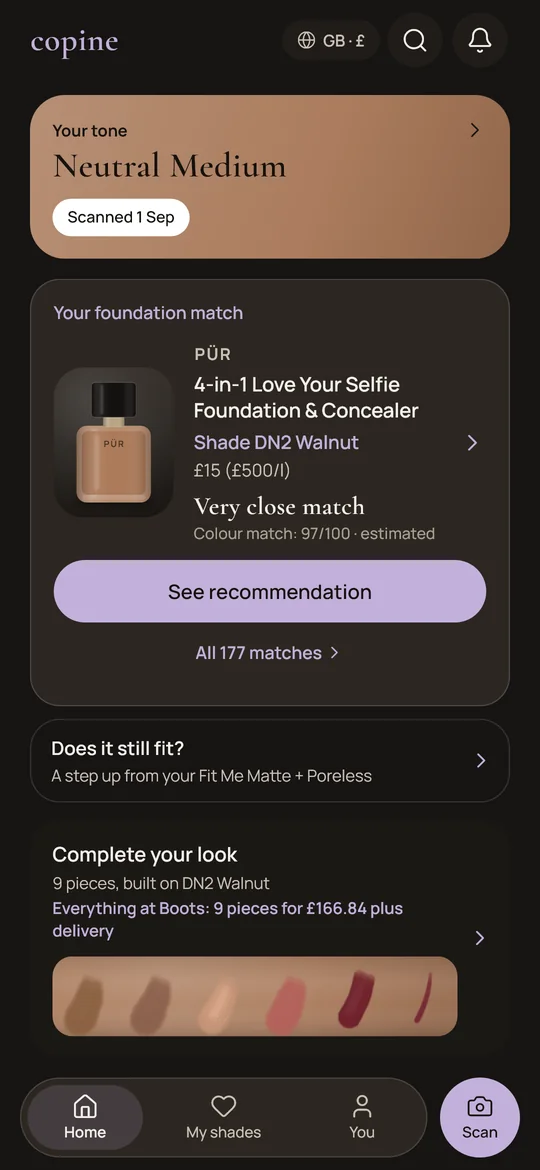
That’s what the Copine app is for: it measures your skin tone with the front camera and finds the right shade directly. The camera images stay on your phone. It comes to iPhone and Android at the same time.
Questions
About the shade finder.
How does the shade finder find the matching shade?
Every shade in the catalogue has a colour value. The shade finder measures the distance between your shade and every shade of the other products, using ΔE2000, the colour industry’s distance measure, and names the closest one per product. It’s the same calculation as in the app.
What do the number and “fits”, “just fits”, “probably not” mean?
The number is the same as in the app. 95 and up “fits”: the difference isn’t visible to the naked eye. 88 to 94 “just fits”: you only see it when both shades are right next to each other. Below that “probably not”: it’s this brand’s closest shade, but not the same colour, and it says which way it’s off. Swatches aren’t a measurement, so there’s no visible difference between 94 and 95; the level and the order say more than the last digit.
How reliable is the result?
As reliable as the brands’ swatches. They aren’t a measurement of the real product, and finish and coverage change how a colour looks on skin. Take the result as a well-founded shortlist, not a guarantee.
Does it work for concealer too?
Yes. Pick “Concealer” above the search and type in the one you wear. A concealer is only compared with concealers, a foundation only with foundations, skin tints, BB/CC creams and powder foundations. The shade finder doesn’t work out which concealer goes with your foundation. The concealer shade guide explains how to choose it.
Where can I buy it in the UK?
Pick your country above the finder: UK, Germany, Austria or Switzerland. It’s preset from your device’s time zone. Matches then only include products a shop in that country sells, in the UK for example Boots or Superdrug. The UK links go to the product page, so pick your shade there, and check it’s in the UK range.
Why is my brand or product missing?
Only products with usable colour data are included. Message me on Instagram with what you’re missing: it helps decide what gets added next.
Is what I enter stored?
The shade finder calculates entirely in your browser; what you search and select isn’t sent anywhere. Only if you click a partner link to a shop do the clicked product and its shade go to the affiliate network as a reference. Your shade is only remembered if you tap “Remember shade”, and then in your browser, so product pages can show you what matches it. You can delete it there with “Choose another shade”. The country for shops is preset from your device’s time zone without sending anything; if you pick one yourself, your browser remembers it. The site sets no cookies.
The app is coming.
Copine comes to iPhone and Android at the same time. The app speaks six languages and so far knows shops in Germany, Austria, Switzerland and the UK. Follow along so you don’t miss the launch.
Until then, the shade finder works right here in your browser, for free and without an account.